Administering promotions
You can administer promotion features such as creating or deleting promotion folders and configuring the promotions engine.
Auth environment. Users with the
following roles can access the Promotions tool:- Site Administrator
- Seller
- Product Manager
- Sales Manager
- Buyer (sell-side)
- Account Representative
- Category Manager
- Marketing Manager
- Marketing Director
- Workspace Taskgroup Approver (read-only)
The following screen capture provides a quick look at the Promotions tool. The Promotions List view of promotions shows all of the promotions that are created in Commerce Lab:
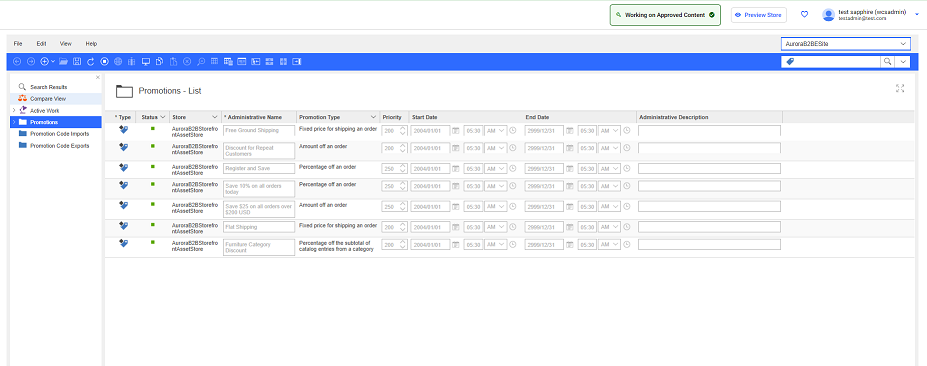
Promotion folders display in the same hierarchy as the list of all promotions for your store.
What you can do with the Promotions tool
Here is a summary of tasks you can do to create and manage promotions for your site:
| Tasks | Details | For more information |
|---|---|---|
| Create promotions | Create promotions that are
based on many predefined promotion types. Purchase
conditions can be based on:
You can also create coupon promotions, and promotions that require promotion codes before the promotion can be applied. Reward options:
Optionally, you can target your promotions to selected customer segments so that only a subset of customers can qualify for the promotion. |
Promotion type feature matrix |
| Manage promotions | Browse the Promotion Calendar. The Promotion Calendar shows how promotions are scheduled in relation to other promotions. | Finding promotions |
| View a list of active and inactive promotions. | ||
| Activate, deactivate, update, and delete promotions. | Activating or deactivating promotions | |
| Import and generate promotion codes. | Importing promotion codes | |
| Group promotions with
promotion folders. Note:
Depending on your site configuration, you can
prevent promotions from displaying in the main
Promotions - List view by
including the promotions in a
folder. |
Organizing promotions with folders | |
| Export promotion codes. | Exporting promotion codes | |
| Archive inactive promotions. Archived promotions to not display in the Promotions tool main promotions list or in promotion folders. | Archiving promotions | |
| Search for
promotions. Search for promotions by name, promotion type, redemption method, start date, and status. |
Finding promotions Search for promotions by name or by promotion code. |