Checkout method: Single shipping and billing address
The checkout method page enables the customer to select their
shipping and billing information. The information is divided into two sections: Shipping information
and billing information. The shipping information section contains the option to switch
to multiple shipments. It contains the shipping address and method for the order. The products
included in the shipments include the product picture, name, quantity, and price. The billing
information section contains the option to use multiple payments, the payment number, and billing
address and method. At the top of the page, the Continue Shopping button is available to navigate
the customer back into the store before completing the checkout process.
Elements of the Checkout method: Single shipping and billing address page
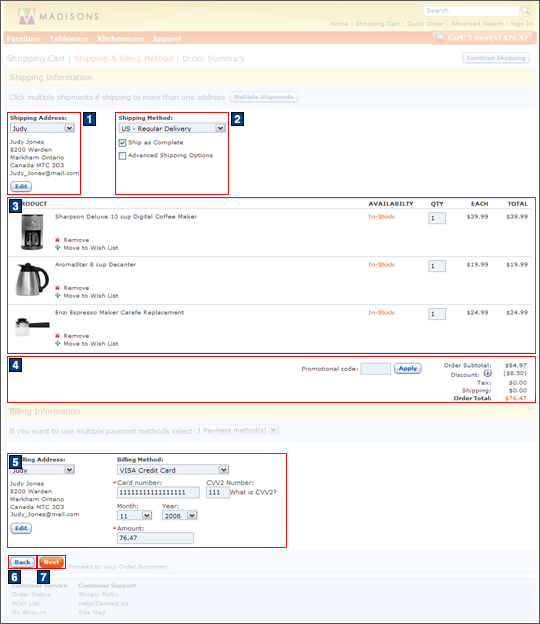
JSP files
- OrderShippingBillingDetails.jsp represents the entire page.
- 1 ShippingAddressSelect.jsp displays the shipping address details.
- 2 SingleShipmentShippingMethodDetails.jsp displays the shipping method details.
- 3 OrderItemDetails.jsp displays the contents of the shopping cart.
- 4
SingleShipmentOrderTotalsSummary.jsp displays the shopping cart's subtotal.Includes:
- PromotionCodeDisplay.jsp displays the Promotion code text box and Apply button.
- 5
CheckoutPaymentsAndBillingAddress.jspf displays the billing address and billing
method details.Includes:
 SimplePunchout.jsp
- BillingAddressDropDownDisplay.jsp
- Visa.jsp
- Amex.jsp
- Mastercard.jsp
- Offline.jsp
- LOC.jsp
- BankServACH.jsp
- Check.jsp
e-Marketing Spots
- There are no e-Marketing Spots on the Checkout method: Single shipping and billing address page.
Store functions
- AJAX checkout can be enabled or disabled.
- AJAX shopping cart can be enabled or disabled
- Store Locator can be enabled or disabled.
- Promotion choice of free gift field can be enabled or disabled.
- 2 Shipping options can be enabled or disabled:
- Multiple shipments.
- Future orders.
- Shipping instructions.
- 4 Promotion code entry field can be enabled or disabled.
Links and buttons
- 3
- When Remove is clicked:
- AjaxOrderChangeServiceItemDelete is called if
AJAX shopping cart is enabled.
- Double-click handling is implemented using JavaScript to prevent multiple requests from being sent.
- The cursor_wait() method is called and displays the progress bar.
- OrderChangeServiceItemDelete is called if AJAX
shopping cart is disabled.
- Double-click handling is implemented using JavaScript to prevent multiple requests from being sent.
- AjaxOrderChangeServiceItemDelete is called if
AJAX shopping cart is enabled.
- When Add to Wish List is clicked:
- AjaxOrderChangeServiceItemDelete and AjaxInterestItemAdd are
called if AJAX shopping cart is enabled.
- Double-click handling is implemented using JavaScript to prevent multiple requests from being sent.
- The cursor_wait() method is called and displays the progress bar.
- OrderChangeServiceItemDelete and InterestItemAdd are called if
AJAX shopping cart is disabled.
- Double-click handling is implemented using JavaScript to prevent multiple requests from being sent.
- AjaxOrderChangeServiceItemDelete and AjaxInterestItemAdd are
called if AJAX shopping cart is enabled.
- When Remove is clicked:
- 6 AjaxOrderItemDisplayView is called when Back is clicked.
- 7
AjaxOrderProcessServiceOrderPrepare and AjaxOrderChangeServicePIAdd are called when
Next is clicked.
- Double-click handling is implemented using JavaScript to prevent multiple requests from being sent.
- The cursor_wait() method is called and displays the progress bar if AJAX checkout is enabled.