Checkout confirmation: Single shipping and billing address
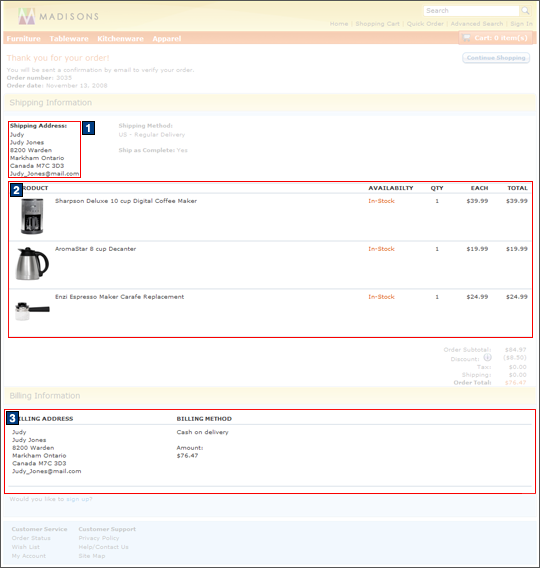
The checkout confirmation page displays a thank you note to the
customer, while confirming that a confirmation e-mail will be sent to verify the order.
The order number and order date are displayed. The information is further divided into
two sections: Shipping information and billing information. The shipping information section
contains the shipping address and method. It also contains the products included in the shipment,
including the product picture, name, quantity, and price. The billing information section contains
the payment number, and billing address and method. At the top of the page, the Continue Shopping
button is available to navigate the customer back into the store after the checkout process has been
completed.
Elements of the Checkout confirmation: Single shipping and billing address page
 The checkout confirmation page contains
a Pay button when punch-out payment is enabled. For example, in the Madisons
starter store:
The checkout confirmation page contains
a Pay button when punch-out payment is enabled. For example, in the Madisons
starter store: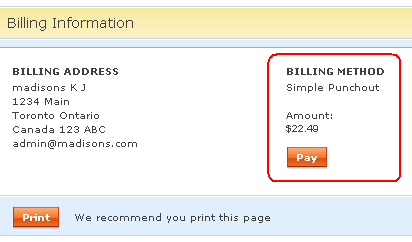
JSP files
- SingleShipmentOrderConfirmation.jsp represents the entire page.
- 1 AddressDisplay.jsp displays the address details.
- 2 OrderItemDetailsSummary.jsp displays the contents of the shopping cart.
- 3
CheckoutPaymentAndBillingAddressSummary.jspf displays the billing detailsIncludes:
- AddressDisplay.jsp, which displays the address details.
e-Marketing Spots
- There are no e-Marketing Spots on the Checkout confirmation: Single shipping and billing address page.
Store functions
- AJAX checkout can be enabled or disabled.
- Store Locator can be enabled or disabled.
- Promotion choice of free gift field can be enabled or disabled.
- Punch-out payment can be enabled or disabled.
Links and buttons
- There are no links or buttons on the Checkout confirmation: Single shipping and billing address page.
- PunchoutPaymentRedirect is called when
Pay is clicked.