My Account: My Address Book
The address book page enables customers to update or remove an
existing address book, or create a new address book. An address book can be used to
identify shipping addresses, billing addresses, or both shipping and billing addresses when
completing the checkout process. The fields that can be entered into a new or existing address book
are first name, last name, street address, city, country/region, state/province, ZIP/postal code,
phone number, and e-mail address.
Elements of the My Account: My Address Book page
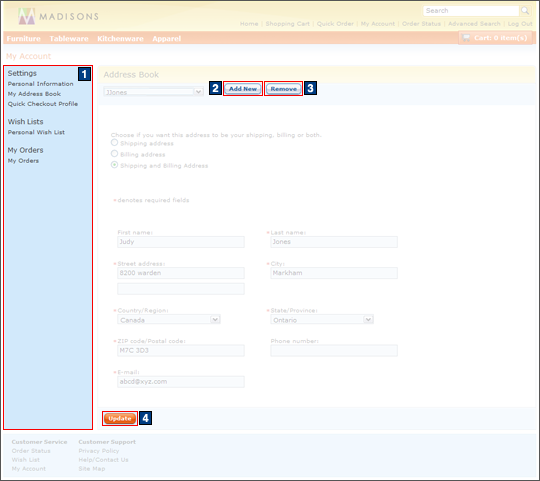
JSP files
- AjaxAddressBookForm.jsp represents the entire page if AJAX My Account is enabled.
- AddressBookForm.jsp represents the entire page if AJAX My Account is disabled.
- 1 MyAccountNavDisplay.jspf displays the left sidebar which contains links which help navigate to the available account views.
e-Marketing Spots
- There are no e-Marketing Spots on the My Account: My Address Book page.
Change flow options
- AJAX My Account can be enabled or disabled.
Links and buttons
- 2 When the Add New button is clicked:
- The addressBook context is updated and displays a new address input form if AJAX My Account is enabled.
- The hidden my-account area appears and displays a new address input form if AJAX My Account is disabled.
- 3 When the Remove button is clicked:
- AjaxPersonChangeServiceAddressDelete is called
if AJAX My Account is enabled.
- Double-click handling is implemented using JavaScript to prevent multiple requests from being sent.
- The cursor_wait() method is called and displays the progress bar.
- PersonChangeServiceAddressDelete is called if
AJAX My Account is disabled.
- Double-click handling is implemented using JavaScript to prevent multiple requests from being sent.
- AjaxPersonChangeServiceAddressDelete is called
if AJAX My Account is enabled.
- 4 When the Update button is clicked:
- AjaxPersonChangeServiceAddressAdd is called if
AJAX My Account is enabled.
- Double-click handling is implemented using JavaScript to prevent multiple requests from being sent.
- The cursor_wait() method is called and displays the progress bar.
- PersonChangeServiceAddressAdd is called if
AJAX My Account is disabled.
- Double-click handling is implemented using JavaScript to prevent multiple requests from being sent.
- AjaxPersonChangeServiceAddressAdd is called if
AJAX My Account is enabled.