
Saved Orders Details
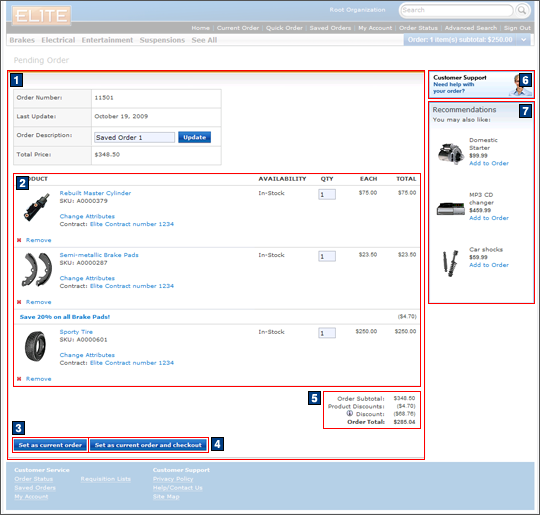
Customers can use the Saved Orders details page to view the details of their pending order, such as the order number, last updated date, order description, and the total price of the pending order. It also contains a list of the items in the pending order.
Elements of the Saved Orders Details page
JSP files
- PendingOrderDisplay.jsp represents the entire page which displays the details of the pending order and the header, footer, and sidebar.
- 1 PendingOrderItemDisplay.jsp displays
a table of information about the pending order.Includes:
- 2 OrderItemDetail.jsp displays the list of products in the pending order.
- 5 SingleShipmentOrderTotalsSummary.jsp displays the total price of the order items in the pending order.
- EmptyShopCartDisplay.jspf displayed if there are no items in the pending order.
e-Marketing Spots
- 6 ShoppingCartRightSideBarAds is the Sidebar Ad e-Marketing Spot that displays a Customer Support image.
- 7 ShoppingCartFeaturedProducts is the Featured Products e-Marketing Spot that displays a list of three product recommendations.
Store functions
- Enable MultipleActiveOrders to display the Saved Orders Details page.
- The AJAX shopping cart can be enabled or disabled.
Links and buttons
- 3 When the Set as Current Order button is clicked, the AjaxSetPendingOrder command is called to set the pending order as the current order.
- 4 When the Set as Current Order and Checkout button is clicked, the AjaxUpdatePendingOrder command is called to set the pending order as the current order without triggering a refresh of the page itself. The OrderProcessServiceOrderPrepare command is called and forwards the customer to the shipping and billing page.
- When the Update button below the list of order items is clicked, the current order is updated to include new item quantities and order name changes. This button is only displayed when the AJAX checkout flow is disabled.
- When the Update button in the order information table is clicked, the AjaxSingleOrderSave command defined in the ServicesDeclaration.js file is called to save the updated order description.
- The Quick Info pop-up window is displayed when the Quick Info button is clicked for a product in the ShoppingCartFeaturedProducts product recommendation e-Marketing Spot.
- The Product Details page is displayed when a product is clicked.
- When the Add to Order button is clicked:
- If AJAX shopping cart is enabled, the AjaxOrderChangeServiceItemAdd command
is called.
- Double-click handling is implemented using JavaScript to prevent multiple requests from being sent.
- The cursor_wait() method is called and displays the progress bar.
- If AJAX shopping cart is disabled, the OrderChangeServiceItemAdd command
is called.
- Double-click handling is implemented using JavaScript to prevent multiple requests from being sent.
- If AJAX shopping cart is enabled, the AjaxOrderChangeServiceItemAdd command
is called.