
Register User
A user must be registered with the Elite store before they can shop from the store. The register user page enables a user to register with the Elite store.
Before a user can register with the Elite store, they must already be registered with a B2B organization that is registered with the Elite store.
Elements of the Register User page
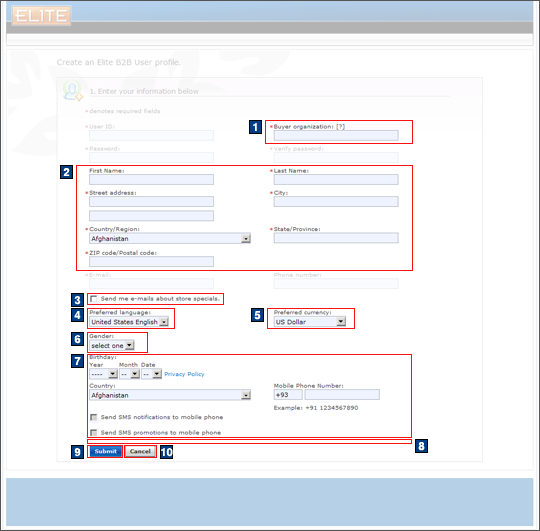
JSP files
- UserRegistrationAddForm.jsp represents the
entire page.Includes:
- B2BUserRegistrationAddExt.jspf, which displays the name of the default organization and the distinguished name of the root organization that is required for organization registration.
- AddressHelperCountrySelection.jspf, which retrieves the list of countries to display.
- 1 B2BBuyerOrg.jspf, which displays the buyer organization field.
- 2 AddressEntryForm.jspf, which displays the address fields.
- RegistrationFlexFlows.jspf, used by flex flow options (preferred language, currency, age, gender, mobile phone, birthday).
- 8 UserRegistrationAddExt.jspf, used by social commerce.
e-Marketing Spots
- There are no e-Marketing Spots on the Register User page.
Store functions
- 3 Customer e-mail option can be enabled or disabled.
- 4 Preferred language can be enabled or disabled.
- 5 Preferred currency can be enabled or disabled.
- 6 Gender can be enabled or disabled.
- 7 Age can be enabled or disabled.
- 7 Mobile phone number and SMS notifications opt-in can be enabled or disabled.
Links and buttons
- 9 When the Submit button
is clicked, the BuyerUserRegistrationUpdate command
is called.
- Double-click handling is implemented using JavaScript to prevent multiple requests from being sent.
- 10 When the Cancel button is clicked, the browser navigates back to the Sign In page.