
Product Fast Finder
The Product Fast Finder combines catalog browsing with client-side filtering capabilities on a single page, enabling customers to easily find products.
The product results are dynamically filtered and displayed on the page as the customer modifies their filter options. The customer can filter options such as the brand names, features, and price range. The category must contain items that have common feature attributes and different brands for accurate filtering results. The product fast finder page consists of the product pictures, names, and prices. Products can be added to the current order or compare view without leaving the product fast finder page. Additional features of the page include quick information pop ups, serving as hover help for each product, and the ability to add products to the wish list.The first page of results is initially loaded while subsequent results are loaded asynchronously in groups of 250 to improve performance.
Any category can be sent to this fast finder page by changing the display JSP page for that category. To change the JSP page, create a SQL statement to add an entry to the DISPCGPREL table for the category.
 The massload utility
is deprecated for WebSphere Commerce Version 7 Feature Pack 6. The
Data Load utility is the recommended command-line loading utility.
If you are currently using the mass load utility, you are recommended
to switch to the Data Load utility to load your CSV and XML input
files into your target database. If your system contains scheduled
and automated processes that use massload, it is recommended that
you update these processes to use the Data Load utility. Other WebSphere
Commerce utilities that use the massload utility, such as the acpload
utility, continue to use the massload utility in WebSphere Commerce
Version 7 Feature Pack 6. If you have business reasons to continue
using the massload utility, you can continue to use this utility.
For more information about the Data Load utility, see Overview of the Data Load utility.
You can switch to the Data Load utility by using the
The massload utility
is deprecated for WebSphere Commerce Version 7 Feature Pack 6. The
Data Load utility is the recommended command-line loading utility.
If you are currently using the mass load utility, you are recommended
to switch to the Data Load utility to load your CSV and XML input
files into your target database. If your system contains scheduled
and automated processes that use massload, it is recommended that
you update these processes to use the Data Load utility. Other WebSphere
Commerce utilities that use the massload utility, such as the acpload
utility, continue to use the massload utility in WebSphere Commerce
Version 7 Feature Pack 6. If you have business reasons to continue
using the massload utility, you can continue to use this utility.
For more information about the Data Load utility, see Overview of the Data Load utility.
You can switch to the Data Load utility by using the TableObjectMediator to
load your data when no business object mediator exists for the data
that you are loading. For more about the TableObjectMediator formation,
see Data Load utility table-based mediator and builder.
Elements of the Product Fast Finder page
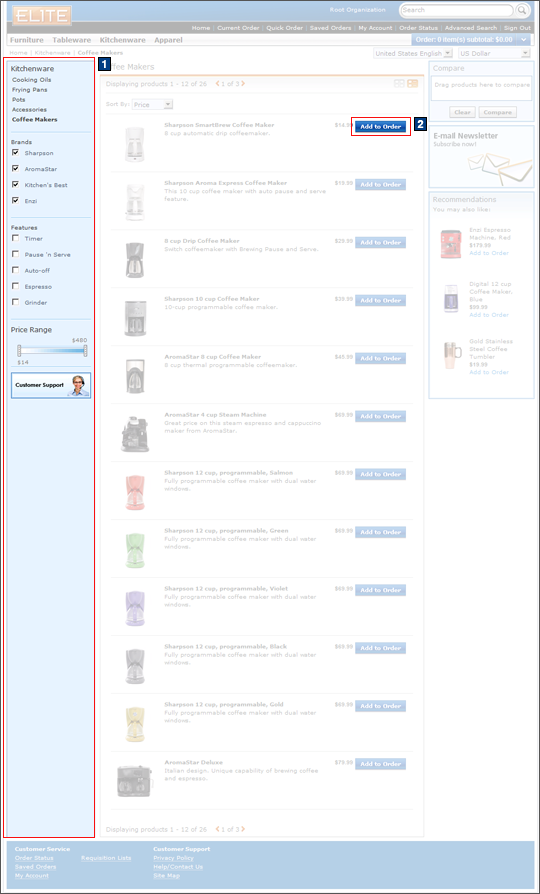
Full size screen capture
JSP files
- FastFinderDisplay.jsp represents the entire page.
The number of results returned on subsequent pages can be customized using ajaxPageSize in the FastFinderDisplay.js file.
- 1 FastFinderNavDisplay.jspf displays the left sidebar with the selectable Product Fast Finder options.
Store functions
- AJAX shopping cart can be enabled or disabled.
e-Marketing Spots
- The are no e-Marketing Spots on the Product Fast Finder page.
Links and buttons
- 2 When the Add to Order button
is clicked:
- AjaxOrderChangeServiceItemAdd is
called if Ajax shopping cart support is enabled.
- Double-click handling is implemented with JavaScript to prevent multiple requests from being sent.
- The cursor_wait() method is called and displays the progress bar.
- OrderChangeServiceItemAdd is
called if Ajax shopping cart support is disabled.
- Double-click handling is implemented with JavaScript to prevent multiple requests from being sent.
- AjaxOrderChangeServiceItemAdd is
called if Ajax shopping cart support is enabled.
- The Quick Info pop-up window is displayed when the Quick Info button is clicked for each product.
- The Product Details page is displayed when a product is clicked.