
My Account: Personal wish list
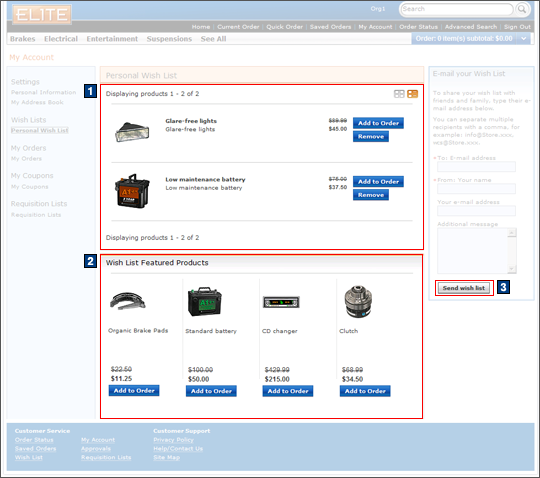
The personal wish list page displays
all the products which have been added to the personal wish list,
as well as a list of featured products following them. Products
displayed in the personal wish list and featured products sections
show the product picture, name, and price. Products can be moved from
the personal wish list or featured product list to the current order
by clicking the Add to Order button following
each product. The customer can e-mail their personal wish list to
friends and family; the personal wish list supports sending this e-mail
to multiple recipients. The available fields for e-mailing a personal
wish list to friends and family are the recipient's e-mail address,
the customer's name, e-mail address, and a message to go along with
the request.
Elements of the My Account: Personal Wish List page
JSP files
- WishlistCommonPage.jsp represents the entire page if AJAX My Account is enabled.
- WishListDisplay.jsp represents the entire page if AJAX My Account is disabled.
- 1 WishListResultDisplay.jsp displays the products in the personal wish list under the Personal Wish List heading.
- 2 ContentAreae-Marketing spot.jsp displays the Featured Products e-Marketing Spot, following the wish list.
e-Marketing Spots
- 2 WishListFeaturedProducts displays the Featured Products e-Marketing Spot.
Store functions
- AJAX My Account can be enabled or disabled.
- AJAX shopping cart can be enabled or disabled.
Links and buttons
- When the Add to Order button is clicked:
- AjaxOrderChangeServiceItemAdd is
called if AJAX shopping cart is enabled.
- Double-click handling is implemented using JavaScript to prevent multiple requests from being sent.
- The cursor_wait() method is called and displays the progress bar.
- OrderChangeServiceItemAdd is
called if AJAX shopping cart is disabled.
- Double-click handling is implemented using JavaScript to prevent multiple requests from being sent.
- AjaxOrderChangeServiceItemAdd is
called if AJAX shopping cart is enabled.
- 1 When Remove is
clicked:
- AjaxInterestItemDelete is called if AJAX My Account is enabled.
- InterestItemDelete is called if AJAX My Account is disabled.
- 3 When the Send wish list button
is clicked, InterestItemListMessage is
called.
- Double-click handling is implemented using JavaScript to prevent multiple requests from being sent.
- The cursor_wait() method is called and displays the progress bar if AJAX My Account is enabled.