
My Account: Summary
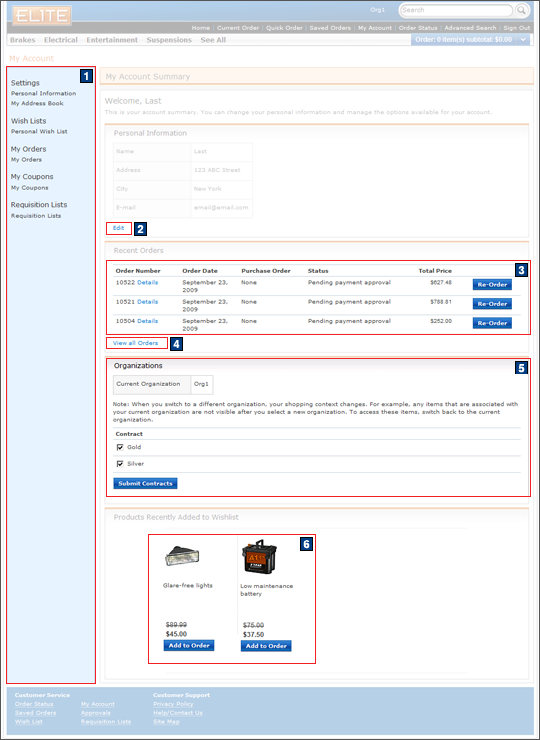
The account summary page is an overview of the account page, and contains the following sections: Personal Information, Recent Orders, Products Recently Added to the Requisition List, and Organizations. The name and logo of the current organization is displayed in the header of the My Account: Summary page.
The Personal Information section contains the customer's name, address, city, and e-mail address, with the option to edit the displayed information.
The Recent Orders section contains a table displaying previous order numbers, order dates, status of individual orders, and total prices. A Re-order button is located next to each order in the table, allowing the customer to create a new order by duplicating a previous order. To view previous orders that are not displayed in the recent orders overview, click View all Orders.
The Products Recently Added to Wish List section displays the product pictures, names, and prices. To move a product from the Requisition List to the current order, click Add to Order for that product.
Customers can use the Organizations section to change the organization that they participate in and use the available contracts.
Elements of the My Account: Summary page
JSP files
- MyAccountDisplay.jsp represents the entire page.
- MyAccountCenterLinkDisplay.jsp displays all
the information under the My Account Summary heading
in the page.Includes:
- 5 B2BMyAccountParticipantRole.jspf displays information for the current organization and contracts.
- 1 MyAccountSidebarDisplay.jspf displays the left sidebar, which links to the available account views.
- 3 OrderStatusTableDisplay.jsp displays a list of all recent orders.
- 6 CatalogEntryDBThumbnailDisplay.jspf displays products recently added to the Wish List.
e-Marketing Spots
- There are no e-Marketing Spots on the My Account: Summary page.
Store functions
- AJAX My Account can be enabled or disabled.
- accountParticipantRole must be enabled.
Links and buttons
- 2 When Edit is clicked, the AjaxUserRegistrationForm command is called.
- 3 When Re-Order is clicked, the AjaxOrderCopy command is called.
- 4 When View all Orders is
clicked:
- If AJAX My Account is enabled, the AjaxOrderStatus command is called.
- If AJAX My Account is disabled, the NonAjaxOrderStatus command is called.
- 5
- When Current Organization is selected, the OrganizationSetInSessionCmd command is called.
- When the Submit Contracts button is clicked, the ContractSetInSessionCmd command is called.
- 6 When the Add to Order button
is clicked:
- If AJAX shopping cart is enabled, the AjaxOrderChangeServiceItemAdd command
is called.
- Double-click handling is implemented using JavaScript to prevent multiple requests from being sent.
- The cursor_wait() method is called and displays the progress bar.
- If AJAX shopping cart is disabled, the OrderChangeServiceItemAdd command
is called.
- Double-click handling is implemented using JavaScript to prevent multiple requests from being sent.
- If AJAX shopping cart is enabled, the AjaxOrderChangeServiceItemAdd command
is called.