
Home
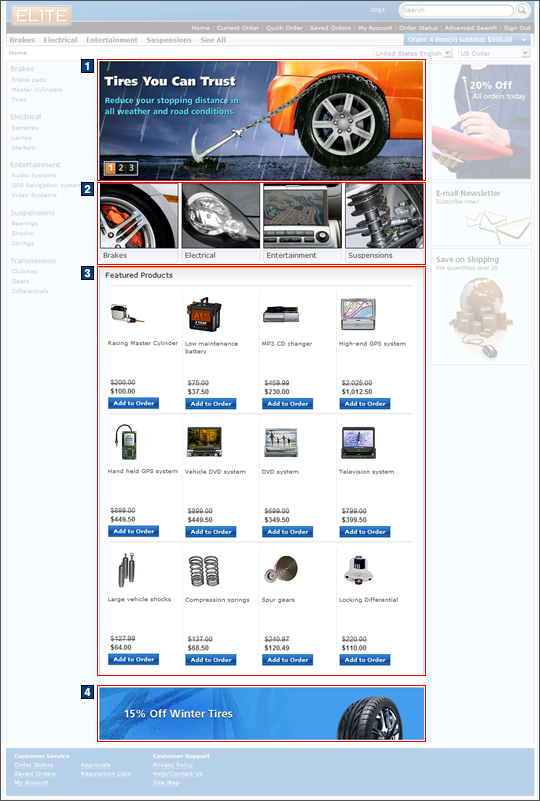
The home page helps customers navigate the store
by displaying a list of available departments to browse, each containing
products. Products are displayed with their picture, name,
and price, and the customer can add the products to their shopping
cart without leaving the home page. Additional features of the home
page include quick info pop ups, serving as hover help for each product,
and the ability to add products to the wish list.
Elements of the Home page
JSP files
- TopCategoriesDisplay.jsp represents the entire page.
- CachedTopCategoriesDisplay.jsp represents the area containing all the e-Marketing Spots combined.
e-Marketing Spots
- 1 HomePageRow1Ads is the first e-Marketing Spot.
- 2 HomePageRow2Ads is the second e-Marketing Spot.
- 3 catgroup_identifierFeaturedProducts is
the Featured Products e-Marketing Spot.Note: For each category page, the catgroup_identifier value corresponds to its respective category identifier.
- 4 HomePageRow3Ads is the e-Marketing Spot located at the bottom of the page.
Store functions
- AJAX shopping cart can be enabled or disabled.
Links and buttons
- 3
- When the Add to Order button is clicked:
- AjaxOrderChangeServiceItemAdd is
called if AJAX shopping cart support is enabled.
- Double-click handling is implemented using JavaScript to prevent multiple requests from being sent.
- The cursor_wait() method is called and displays the progress bar.
- OrderChangeServiceItemAdd is
called if AJAX shopping cart support is disabled.
- Double-click handling is implemented using JavaScript to prevent multiple requests from being sent.
- AjaxOrderChangeServiceItemAdd is
called if AJAX shopping cart support is enabled.
- The Quick Info pop-up window is displayed when the Quick info button is clicked for each product.
- The Product Details page is displayed when a product is clicked.
- When the Add to Order button is clicked: