
Department
The department pages help customers navigate through the Elite starter store by only displaying products based on the department being viewed.
Products are displayed with their picture, name, price, and the Add to Order button. Switching to the detailed view of the product listing displays an additional short description for each item. Products can be added to the current order or compare view without leaving the department page. Additional product details are displayed when viewing the quick info popup, where adding a product to the wish list is also available.
Elements of the Department page
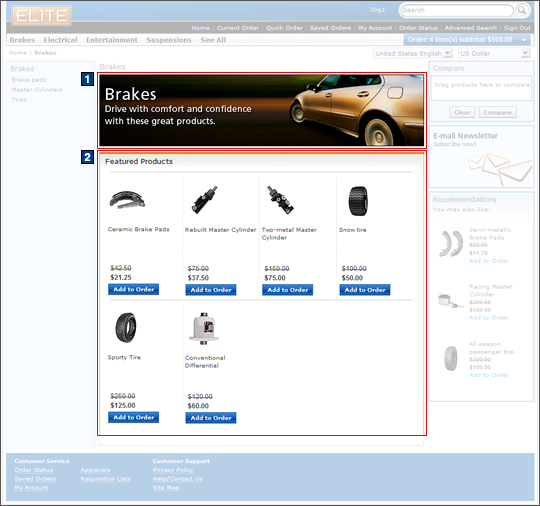
Images
- 1 CategoryFullImage is the header image retrieved according to the appropriate category.
JSP files
- DepartmentDisplay.jsp represents the entire page.
- SubCategoriesListDisplay.jsp displays the full list of subcategories on the left sidebar.
- 2 ContentAreaESpot.jsp displays featured products.
- DepartmentDisplayExt.jsp represents the department display extension.
e-Marketing Spots
- 2 catgroup_identifierFeaturedProducts is the Featured Products e-Marketing Spot.
Store functions
- AJAX shopping cart can be enabled or disabled.
Links and buttons
- 2
- When the Add to Order button is clicked:
- AjaxOrderChangeServiceItemAdd is
called if AJAX shopping cart support is enabled.
- Double-click handling is implemented using JavaScript to prevent multiple requests from being sent.
- The cursor_wait() method is called and displays the progress bar.
- OrderChangeServiceItemAdd is
called if AJAX shopping cart support is disabled.
- Double-click handling is implemented using JavaScript to prevent multiple requests from being sent.
- AjaxOrderChangeServiceItemAdd is
called if AJAX shopping cart support is enabled.
- The Quick Info pop-up window is displayed when the Quick info button is clicked for each product.
- The Product Details page is displayed when a product is clicked.
- When the Add to Order button is clicked: