

Defining Attributes for Variable Substitution in Policies
You can define attributes in WebUI, so that you can include them in target devices by the defined attributes. Attributes defined through the Define Attributes page serve a critical role beyond Smart Group filtering — they determine which LDAP/Active Directory attributes are available for variable substitution in Android policies such as App Configurations, Wi-Fi profiles, VPN configurations, and SCEP certificate profiles.
About this task
Procedure
-
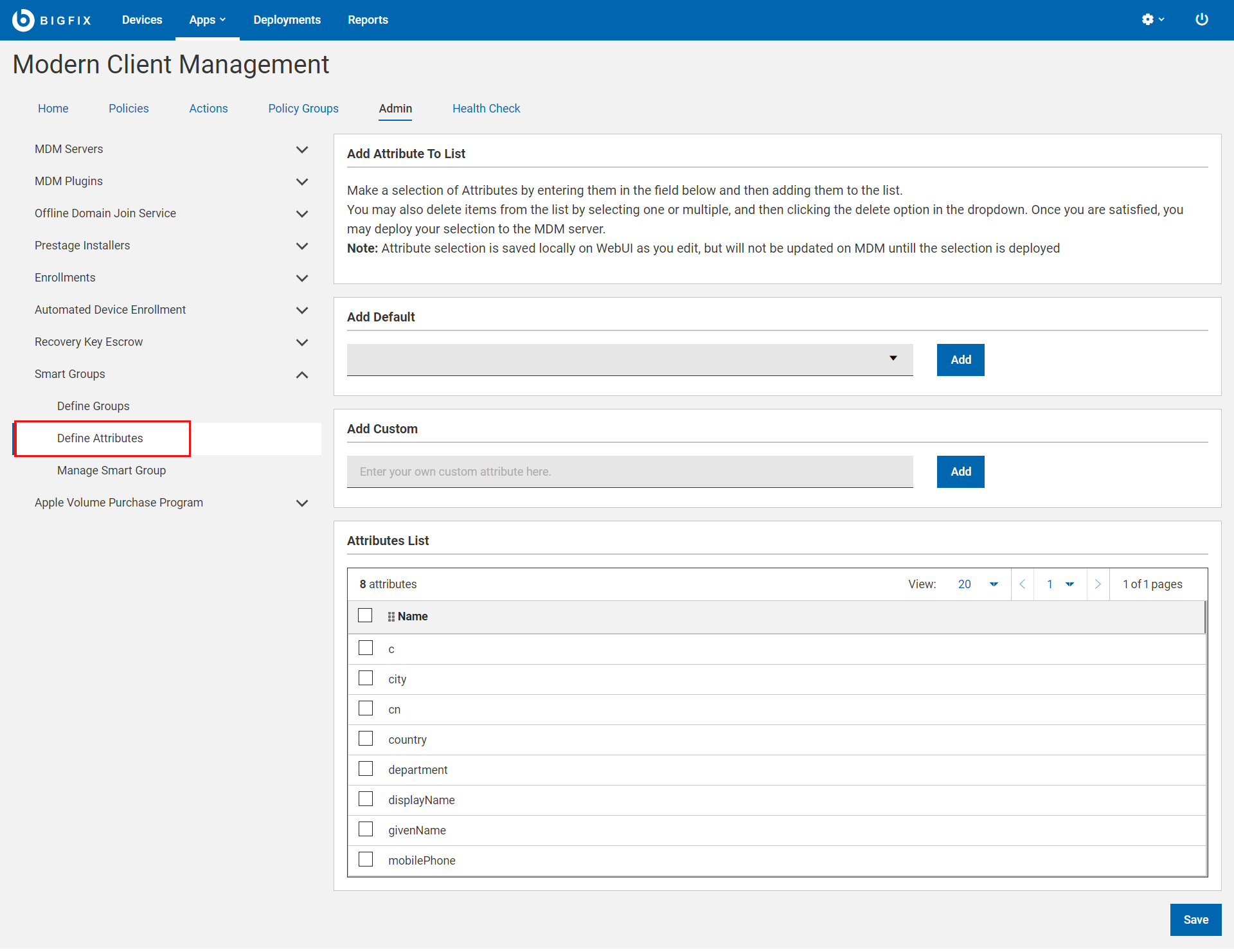
From the MCM Admin page, explore Smart
Groups and click Define Attributes.
-
Add Default: Click this drop down to view the list of
supported attributesand select
one from the list. Click Add to add it to the Attributes
List.
or
Add Custom: Enter a string and click Add to add a custom attribute to the Attributes List.
-
Click Save to deploy all the attributes added to the
grid on to the MDM server.
If you want to delete an attribute from the grid before deploying it on to the MDM server, select the attribute that you want to delete and from the blue action bar, select Delete.
What to do next
${UserPrincipalName}), the MCM server resolves the
variable by querying the Identity Service, which in turn queries your LDAP/Active
Directory. However, the Identity Service only requests attributes that are included
in the Supported Attribute List. If an attribute is not defined here, the server
will successfully locate the user in AD but will not return the attribute value,
causing the variable to remain unresolved.