Logging paths
This page lists the default paths of the BigFix log files relative to: installation, upgrade, running components, plugins, and audit.
For information detailing how to enable, disable, and configure these logs, see Configuring logs.
Running components logs
- Windows:
C:\Program Files (x86)\BigFix Enterprise\BES Server\BESRelay.log - Linux:
/var/log/BESRelay.log
- Windows:
C:\Program Files (x86)\BigFix Enterprise\BES Server\server_audit.log - Linux:
/var/opt/BESServer/server_audit.log
- Windows:
C:\Program Files (x86)\BigFix Enterprise\BES Server\FillDBData\FillDB.log - Linux:
/var/opt/BESServer/FillDBData/FillDB.log
- Windows:
C:\Program Files (x86)\BigFix Enterprise\BES Server\GatherDBData\GatherDB.log - Linux:
/var/opt/BESServer/GatherDBData/GatherDB.log
- Windows:
http://127.0.0.1:52311/cgi-bin/bfenterprise/BESGatherMirrorNew.exe - Linux: Status Report does not exist.
- Windows:
C:\Program Files (x86)\BigFix Enterprise\BES Relay\logfile.txt - Linux:
/var/log/BESRelay.log
- On Windows, there are two or more BESAdmin log files:
- For each user that runs BESAdmin, there is a specific log file
C:\Users\<USERNAME>\AppData\Local\BigFix\BESAdminDebugOut.txtFor example:
C:\Users\Administrator\AppData\Local\BigFix\BESAdminDebugOut.txt - When BESAdmin is called by a Fixlet (or run as LocalSystem), the log file
is
C:\Windows\System32\config\systemprofile\AppData\Local\BigFix\BESAdminDebugOut.txt
- For each user that runs BESAdmin, there is a specific log file
- On Linux systems, there is a single log file, located in the following folder:
/var/log/BESAdminDebugOut.txt
- On Windows, there are two or more BESAdmin log files:
- For each user that runs BESAdmin, there is a specific log file
C:\Users\<USERNAME>\AppData\Local\BigFix\besadmin_audit.logFor example:
C:\Users\Administrator\AppData\Local\BigFix\besadmin_audit.log - When BESAdmin is called by a Fixlet (or run as LocalSystem), the log file
is
C:\Windows\System32\config\systemprofile\AppData\Local\BigFix\besadmin_audit.log
- For each user that runs BESAdmin, there is a specific log file
- On Linux systems, there is a single log file, located in the following folder:
/var/log/besadmin_audit.log
BESTools log
- Windows:
C:\Program Files (x86)\BigFix Enterprise\BES Server\BESTools.log - Linux:
/var/log/BESTools.log
BES Server Plugin Service log
The directory of the log file is C:\Program Files\BigFix Enterprise\BES
Server\Applications\Logs.
- Windows:
C:\Users\<USERNAME>\AppData\Local\BigFix\BESInitializeBESReportsDB.txtFor example:
C:\Users\Administrator\AppData\Local\BigFix\BESInitializeBESReportsDB.txt - Linux:
/var/log/BESInitializeBESReportsDB.txt
- Windows:
C:\Program Files (x86)\BigFix Enterprise\BES Explorer\BESExplorer.log - Linux:
/var/log/BESExplorer.log
Plugin Portal log
- Windows:
C:\Program Files (x86)\BigFix Enterprise\BES Plugin Portal\BESPluginPortal.log - Linux:
/var/log/BESPluginPortal.log
- Windows:
C:\Program Files (x86)\BigFix Enterprise\BES Plugin Portal\Plugins\<Plugin_name>\Logs\log.txt - Linux:
/var/opt/BESPluginPortal/Plugins/<Plugin_name>/Logs/log.txt
WebUI logs
The BigFix WebUI has several logs. There is a single log for the service and several for the NodeJS processes.
BES WebUI Service application log
- Windows:
C:\Program Files (x86)\BigFix Enterprise\BES WebUI\service-wrapper.log - Linux:
/var/opt/BESWebUI/service-wrapper.log
WebUI NodeJS processes log folder
- Windows:
C:\Program Files (x86)\BigFix Enterprise\BES WebUI\WebUI\logs - Linux:
/var/opt/BESWebUI/WebUI/logs
Client log
[year][month][day].log. If an active log reaches
512K in size it will be moved to a backup (.bkg) file and a new log will be started for the
current day. If the log reaches 512K again the backup will overwrite the existing backup.
Both the active and backup logs will be deleted after ten days. These are the default
locations of the BigFix Client
logs for each operating system:- Windows:
C:\Program Files\BigFix Enterprise\BES Client\__BESData\__Global\Logs - UNIX, Linux:
/var/opt/BESClient/__BESData/__Global/Logs - Mac:
/Library/Application Support/Bigfix/BES
              Agent/__BESData/__Global/Logs
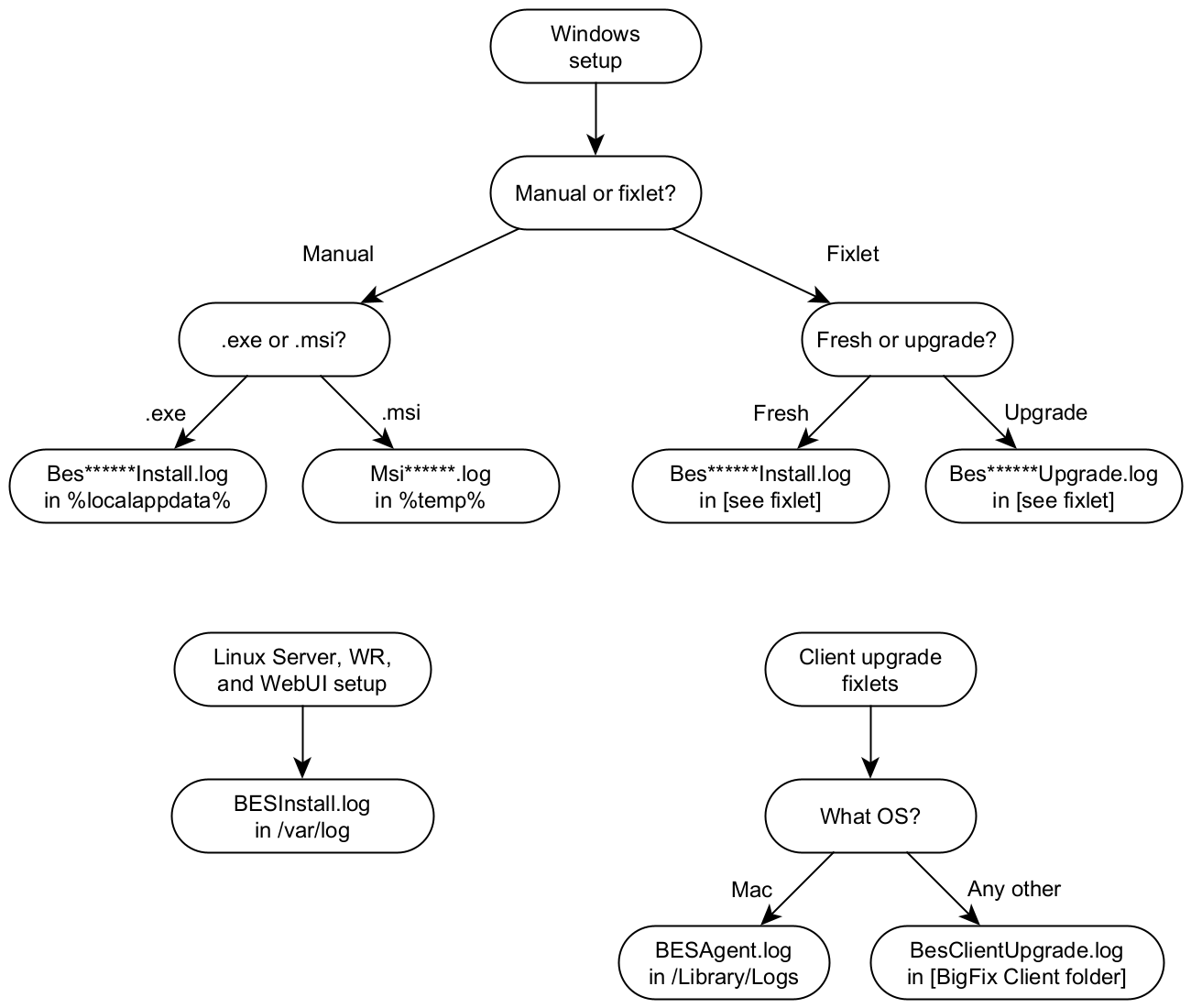
Fixlet installation and upgrade logs
If you install or upgrade a BigFix component using a Fixlet, the path of the installation log is determined by the Fixlet.
{BigFix Client folder}\BesClientDeployToolInstall.log, for the Client Deploy Tool (CDT){BigFix Client folder}\BesConsoleInstall.log, for the Console{BigFix Client folder}\BesPluginPortalInstall.log, for the Plugin Portal{BigFix Client folder}\BesExplorerInstall.log, for the Explorer{BigFix Client folder}\BesRelayInstall.log, for the Relay{BigFix Client folder}\BesWebUiInstall.log, for the WebUI Service
C:\BesInstallationGeneratorUpgrade.logC:\BesServerUpgrade.log, for the Server and local Web ReportsC:\BesWebReportsUpgrade.log, for standalone (remote) Web Reports{BigFix Client folder}\BesClientDeployToolInstall.log, for the Client Deploy Tool (CDT){BigFix Client folder}\BesClientUpgrade.log, for the Windows Client/Library/Logs/BESAgent.log, for the Mac Client{BigFix Client folder}/BesClientUpgrade.log, for all the others Clients{BigFix Explorer folder}\BesExplorerUpgrade.log, for the Explorer{BigFix Relay folder}\BesRelayUpgrade.log, for the Relay{BigFix Server API folder}\BesServerApiUpgrade.log, for the Server API{BigFix WebUI folder}\BesWebUiUpgrade.log, for the WebUI Service
Manual installation and upgrade logs on Windows
Before BigFix 10.0.8, no log is created by default when manually running a BigFix installer on Windows.
Such logs can still be created by passing specific options to the installers or by changing the default Windows settings as described here to globally enable the installation logging.
Starting from BigFix 10.0.8, if you run an .exe setup manually to install or upgrade a
BigFix component, the installation log will be saved in the %LocalAppData%
folder.
BesClientInstall.log, for the ClientBesConsoleInstall.log, for the ConsoleBesInstallationGeneratorInstall.log, for the Installation GeneratorBesPluginPortalInstall.log, for the Plugin PortalBesRelayInstall.log, for the RelayBesServerApiInstall.log, for the Server APIBesServerInstall.log, for the Server and/or Web ReportsBesWebUiInstall.log, for the WebUI Service
If you run an .msi setup manually to install or upgrade a BigFix component, the
installation log will be saved in the %temp% folder. Their names are
randomly generated but follow the pattern: Msi*.log.
Manual installation and upgrade logs on Linux
On Linux, the BigFix Server installer always produces a log by default and saves it in
/var/log/BESInstall.log.
Remember that the BigFix Server installer can install several components at once: the Server, Web Reports, the WebUI and the Client.
The Client upgrade Fixlets create a log since BigFix Version 10 Patch 8.
Chart of installation log locations