
Update MDM Components
Learn how to update MDM components.
- You must be a Master Operator to perform this task through WebUI.
- You need PlugIn Portal version 10.0.2 or later to update the MDM Plugins to the latest version.
Update MDM Server
To update MDM Server:
-
From the WebUI main page, click .
-
On the Modern Client Management page, click .
- On the Admin page, from the left navigation, under MDM Server, click Update
-
In the Target Devices section, click Edit Devices. A list of the available servers that need an update is displayed. Select the required servers and click OK.
-
Click Deploy. WebUI runs the update on the targeted server.
You will not be able to select more than one device to upgrade the server or plugin.
If you select more than one device, the following error is shown. 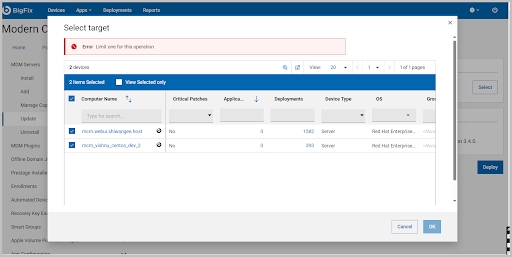 When we cannot
select more than 1 device for update, then the message "You are deploying to 1
device." may not be meaningful. These should be raised as defects.
When we cannot
select more than 1 device for update, then the message "You are deploying to 1
device." may not be meaningful. These should be raised as defects.
Update MDM Plugin
To update MDM Plugin:
-
From the WebUI main page, click .
-
On the Modern Client Management page, click .
-
On the Admin page, from the left navigation, under MDM Plugin, click Update.
-
In the Target Devices section, click Edit Devices. A list of the available devices that need an update is displayed. Select the required device and click OK.
-
Click Deploy. WebUI runs the update on the targeted server.