
Setting the BigFix Console lock timeout
Starting from BigFix Version 11.0.7, you can use a new setting controlling the BigFix Console lock timeout, named LocalTimeoutLockMinutes, which is configurable locally on the selected BigFix Console instances.
This way, the BigFix Console will be locked after the configured timeout, but it will keep synchronizing with the BigFix Root Server.
To configure it on the selected Consoles, the LocalTimeoutLockMinutes setting must be added to the Windows Registry, under the HKEY_CURRENT_USER\Software\BigFix\Enterprise Console\Preferences path, as REG_SZ, specifying the timeout value in minutes, as shown in the image below.
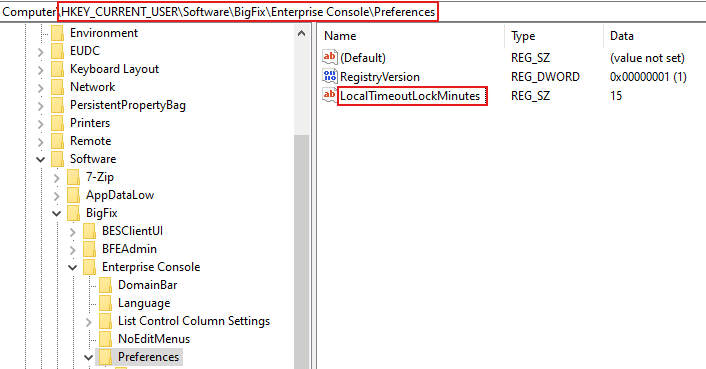
Setting the value for LocalTimeoutLockMinutes, in the Windows Registry of the local BigFix
Console instance, overrides the value specified for the advanced setting named
timeoutLockMinutes described in List of advanced options.