
Configuring PeerNest without the multicast function
Up to BigFix Platform 11.0.3, the PeerNest implementation is based on multicast UDP messages exchanged between the BigFix Clients (peers). In this old implementation, the BigFix Relay is completely unaware of PeerNest.
Starting from BigFix Platform 11.0.4, in the new PeerNest implementation, the BigFix Relay takes active part in the PeerNest architecture by acting as a file request broker. Each peer (BigFix Client) that needs to download a file asks the BigFix Relay for information about that specific file. The Relay will, then, keep track of "which BigFix Client has what" in the BigFix database by acting as a "custom tracker".
Enable the new PeerNest implementation by setting the
_BESClient_PeerNest_DisableMulticast configuration parameter to 1 (default
value is 0) on the BigFix Clients. A restart is required for the change to be effective.
Clients that have multicast disabled (this configuration parameter set to 1) will not send any
multicast messages but they will still be able to receive multicast messages from other
Clients (if the network configuration allows to do so) and answer with unicast UDP messages,
to ensure backward-compatibility with the old PeerNest implementation.
- Clients will request to download files from the Relay; if the file is not available on any peer, the Relay will wait for a defined amount of time before answering, by default 30 seconds and will reply to the client with higher priority that requested the file, by allowing the client to download the file from the Relay. In the meantime, the other clients will be replied that the file is being downloaded by another peer, so they will keep asking for the file periodically until the first client completes the file download.
- The downloading client will notify the Relay that it completed the downloading and caching. The Relay updates the information in the database. The Relay replies to the other clients, which were still waiting for the file, by providing information about the client that is ready to share the file with them.
- The PeerNest network can increase the number of clients which share information with the Relay and files with the other peers. BigFix Clients (peers) must be located in the same subnet and they can share files among each other only if they are direct descendants of the same BigFix Relay.
The following picture shows a sample scenario in which three clients start downloading and sharing a file (File 1), while they are already sharing some previously downloaded files.
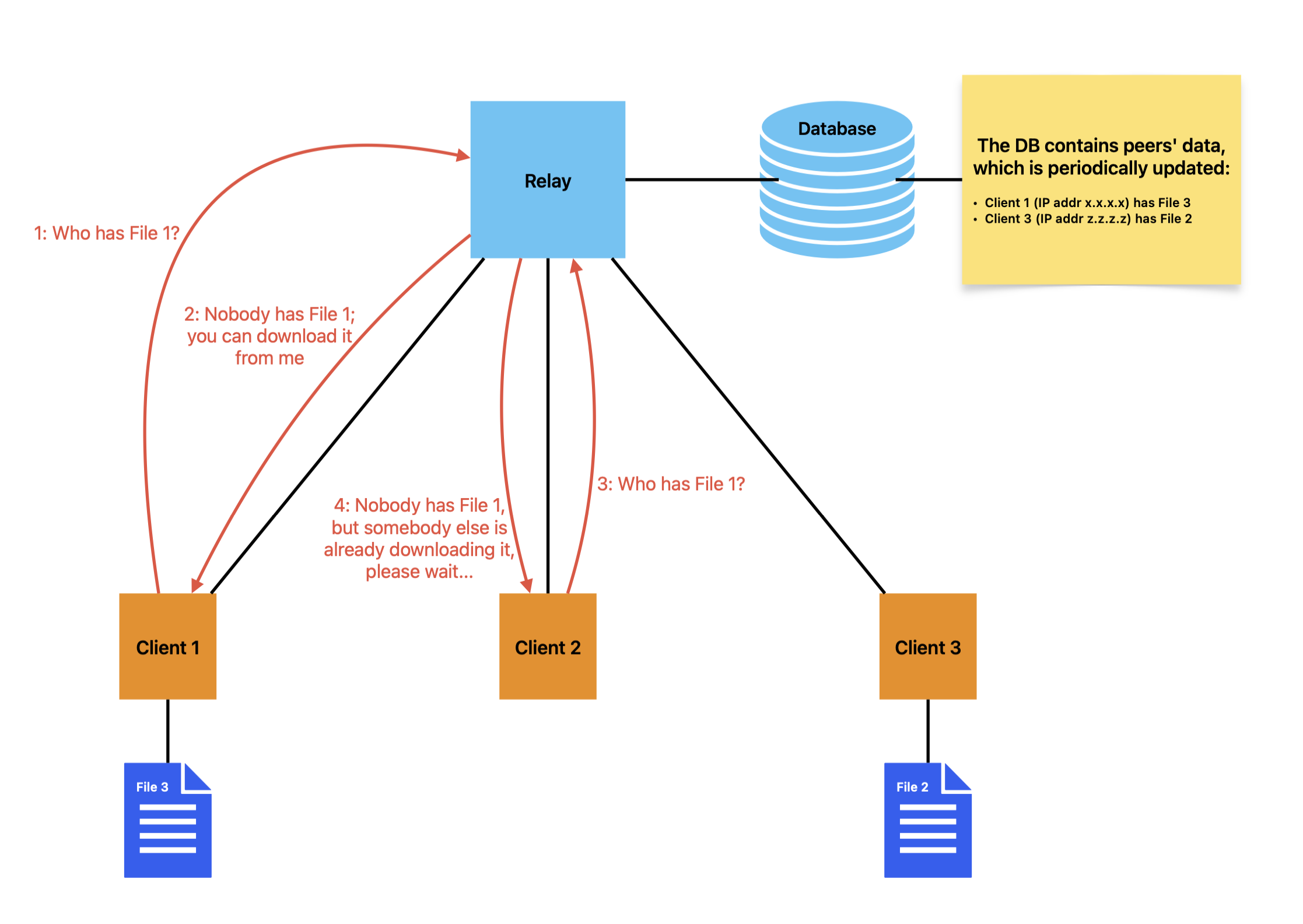
BigFix Peer-to-Peer Site Gather (No-Multicast)
Starting from BigFix Platform
11.0.6, by combining the multicast disabled configuration and the
_BESClient_PeerNest_EnableGather setting, it is possible to use peers in
no-multicast mode for site gathering. In this state the BigFix Relay acts as the central
orchestrator for site distribution within a subnet. This mechanism prevents bandwidth
saturation by ensuring only a single "leader" client, selected based on priority or Computer
ID, downloads the site from the Relay, while other peers wait to pull the data locally.
- When a client requires a site update, it sends a gather request to its parent Relay.
- If the Relay determines the site version isn't yet available on any local peer, it pauses for a predefined interval. It then designates the client with the highest "entitlement" (priority) to perform the gather.
- All other requesting clients receive a "Download In Progress" status from the Relay and enter a Waiting state.
- The designated leader downloads the site from the Relay. Once finished, it sends a message to the Relay to register itself as a local source for that specific site version.
- The Relay sends a UDP Ping to all clients currently in the waiting state, signaling that the data is ready.
- The waiting clients resubmit their gather requests. Instead of sending the files directly, the Relay provides a list of peers (the leader) that have the site cached, allowing the clients to complete the gather locally.