External Repository Sites
Up to BigFix 11.0.6, managing custom content across multiple root servers and environments presents significant challenges:
- Custom content is packaged and published separately.
- Repository history is not the site version source of truth.
- Cross-environment tracing of author and commit is difficult.
Starting with BigFix 11.0.7, integrating BigFix directly with external source control systems (Git) allows BigFix to treat repositories as "External Sites" and gather content directly at the source.
- Unified Source of Truth: Centralized versioning and clear cross-environment history tracking.
- DevOps Integration: Full compatibility with modern CI/CD and automation pipelines.
- Enhanced Governance: Improved visibility into content evolution while maintaining strict content confidentiality.
- A new External Site type recognized by a repository-specific gather URL.
- Repository URL and branch define the source identity.
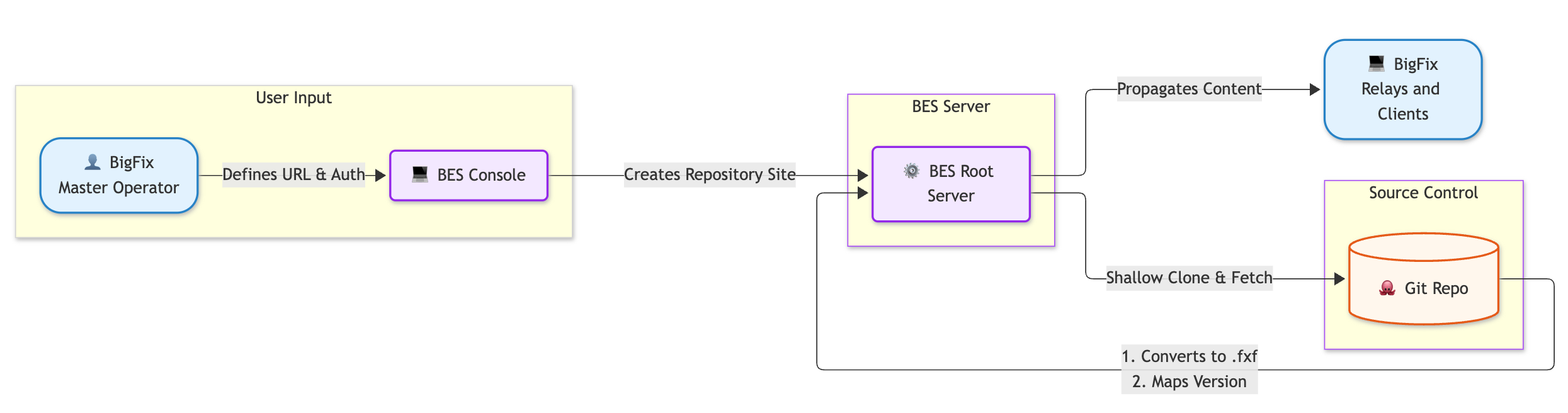
- Initial synchronization uses a shallow clone; later cycles reuse the local repository and perform incremental fetches.
- The generated site behaves like traditionally published external content: signed listing first, then file hash validation.
- A manual Gather operation triggers an immediate repository check; normal scheduling uses the configured polling period.
- Repository SSH access and known_hosts verification protect synchronization.
Before creating a site, ensure that:
- The BigFix Server and endpoints that use an External Repository Site run BigFix 11.0.7 or later.
- You have Master Operator privileges in the BigFix Console.
- The BigFix Server can reach an SSH Git repository containing BigFix site content, and the Git account has read access to it.
- The BigFix Server has the SSH credentials and trusted host keys described below.
Prepare SSH access on the BigFix Server
Repository access is read-only. The BigFix Server creates the RepositorySiteGather/GitCredentials directory under the BES Server storage directory at startup. Place the following files in that directory before importing the site:
RepositorySiteGather/
├── GitCredentials/
│   ├── id_rsa
│   ├── id_rsa.pub
│   └── known_hosts
└── Sites/ # published site data- Place an SSH private key in id_rsa and its matching public key in id_rsa.pub. Register the public key with a Git service account authorized to read the repository. For GitHub, the account needs read access to repository contents.
- Obtain the Git host's public host key and verify its fingerprint with the Git administrator through a trusted channel. Add the verified key to known_hosts. Do not rely on an unverified key scan as proof of the host's identity.
- Restrict access to the private key and ensure that the BES Server service account can read it. Confirm that the BigFix Server can reach the Git host over SSH.
BigFix 11.0.7 requires the credential filenames shown above. To generate an RSA PEM key pair on the BigFix Server, run:
ssh-keygen -m PEM -t rsa -b 4096 -f id_rsa -N ""SSH credentials are managed on the BigFix Server, not in the BigFix Console dialog.
Create an External Repository Site in the BigFix Console
As a Master Operator, choose in the BigFix Console. The dialog creates an External Repository Site masthead and imports the site. Repository SSH credentials are configured on the BigFix Server, not entered in this dialog. For details about the dialog, see Create Repository Site.
After creation, the Sites list shows the site type as Repository. Site details show Repository Site, the repository URL, and the branch. When at least one Repository Site has been gathered, License Overview shows an External Repository Sites tab.
Verify synchronization and gathering
After import, the BigFix Server checks the configured branch, performs an initial shallow clone, compiles and publishes the content, and the normal gather process imports it. Subsequent checks reuse the local repository and fetch changes. Use Gather in the BigFix Console to check immediately instead of waiting for the scheduled poll.
Check the site details for the current version and the expected repository URL and
branch. In the BigFix Server log, look for Repository site cloned
successfully on the first sync or Repository site updated
successfully on later syncs. In GatherDB.log,
confirm that the site version was imported successfully. A 404 response during
the first sync can be temporary until publishing finishes.
Repository Site identity and versions
The repository URL and selected branch are encoded in the gather URL for sites created through the BigFix Console:
bigfix://bigfix.com/repositorysite?repository_url={repository_url}&git_branch={branch}The Site ID is derived from the source configuration. The same repository URL and branch produce the same Site ID and gather URL across deployments; changing either changes the identity. A masthead created in the BigFix Console is trusted only in the deployment that issued it, even when the source identity matches.
The site version is the depth of the selected commit from the repository root. By default, a new commit at the selected branch HEAD results in a new published site version. If several commits arrive between checks, the published version advances to the depth of the latest selected commit and can skip intervening version numbers.
Updates are forward-only. To restore earlier content, create a new Git revert commit instead of rewinding the branch. If history is rewritten by a force-push, plan a site deletion and reimport to clear the BigFix Server's local synchronization state; do not expect the existing site to roll back automatically.