
Filter Section Overview
Discover how the Filter Section allows users to narrow down the compliance data based on saved configurations or create custom filters.
About this task
Procedure
-
Saved Filters
- Displays default and user-saved filters.
- Data is fetched from the saved filter cache, not directly from the database.
- Cached data is auto-updated at scheduled intervals.
- Use the Refresh button to fetch the latest data directly
from the database.Note: Refreshing may take longer if multiple endpoints are involved.
Figure 1. Saved Filter 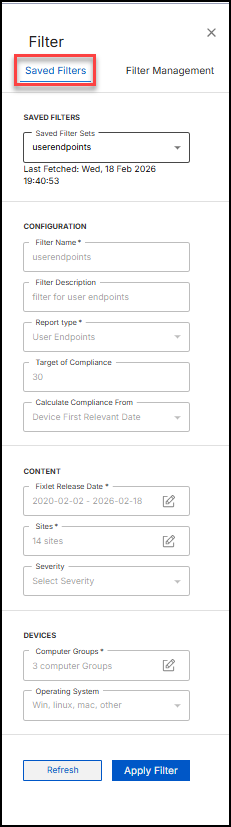
-
Filter Management
- Create, update, or delete custom filters.
- Schedule periodic data fetches at defined intervals.
- Save filters for reuse across reporting sessions.
Figure 2. Filter Management 