Post-Execution Action Script Tab
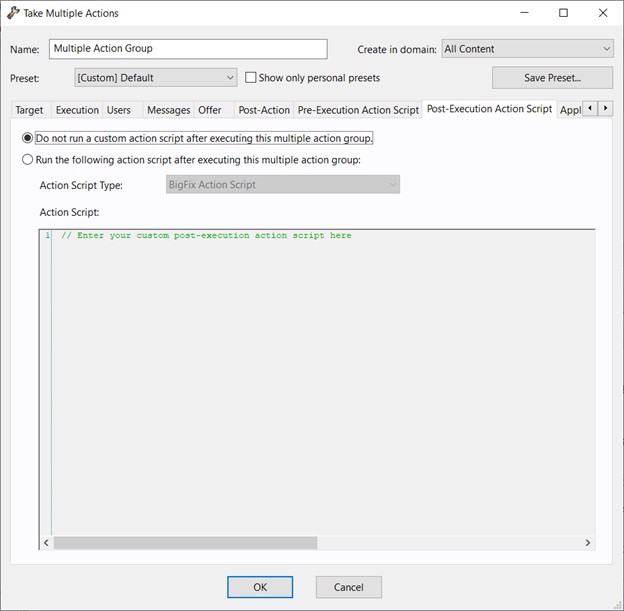
In the Pre-Execution Action Script tab of the Take Multiple Actions dialog, you can create an action script that runs after the chosen set of actions is run.
- Take action when deploying a baseline
- Take multiple actions
- Do not run a custom action script after executing this multiple action group
- This is the default for most Fixlet actions, and is the recommended option.
- Run the following action script after executing this multiple action group
- You can select one of the following options and either modify
the existing script or enter a new script in the text area. Select
the type of action script that you want to use for this script:
- BigFix Action Script
- This is the BigFix standard scripting language for actions.
- AppleScript
- This is Apple's scripting language for controlling computer resources.
- sh
- The action is a shell script to be run by a Linux or a UNIX or a bsd shell.
- PowerShell
- Starting from version 10.0.4, BigFix gives you the
possibility to run PowerShell scripts too.
You can run on a selected Windows Client the script that you write in the Action Script text box. The script runs on the PowerShell installed by default by your Windows operating system in the C:\Windows\System32\WindowsPowerShell\v1.0 directory, if available, or in C:\Windows\SysWOW64\WindowsPowerShell\v1.0.
The script is executed by default using the -ExecutionPolicy Bypass option. To avoid using this option, you can use the
_BESClient_PowerShell_DisableExecPolicyBypassclient setting described in the Miscellaneous section of the List of settings and detailed descriptions page.Since they are executed in hidden mode, PowerShell scripts requiring user interaction or showing pop-up windows or dialog boxes are not supported and might cause the action to remain in running status or the script to display an error in the log file.