
Single sign-on based on the exchange of Security Access Markup Language token
Single sign-on based on the exchange of Security Access Markup Language (SAML) request has several steps and uses an external Identity Provider server to authenticate the application user. BigFix Inventory supports SAML version 2.0.
A SAML assertion is an XML-formatted token that is used
to transfer user identity and attribute information from the Identity
Provider of a user to a trusted Service Provider as
part of the completion of a single sign-on request. A web user authenticates
to a SAML identity provider, which produces an SAML assertion, and
the service provider consumes the SAML assertion to establish a security
context for the web user. The following are the parties in this exchange
of authentication data.
- Service Provider
- BigFix Inventory - the application that requests the authentication service.
- Identity Provider
- The service that authenticates the application users, for example Active Directory Federation Services.
- Application User
- The person who uses several applications in one domain and who wants to single sign-on to those business applications.
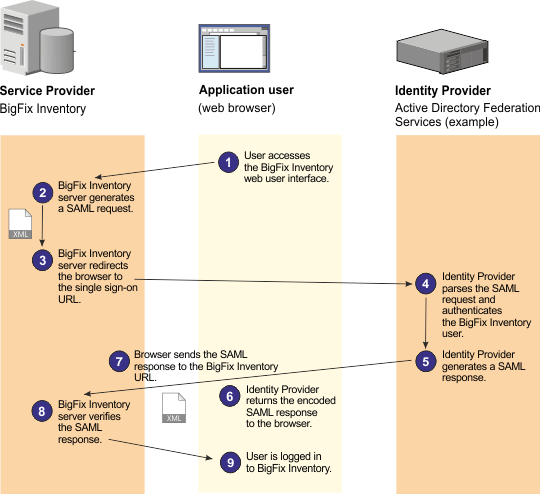
The following are the detailed steps that are performed
during a typical single sign-on based on the exchange of the SAML
token:
- You log in to the BigFix Inventory web user interface.
- The BigFix Inventory server generates a SAML request.
- BigFix Inventory server redirects the browser to the single sign-on URL.
- The Identity Provider server parses the SAML request and authenticates the user.
- The Identity Provider server generates a SAML response.
- The Identity Provider server returns the response to the web browser.
- The BigFix Inventory server verifies the SAML response.
- You are logged in to the application.